Govern Your Agents and Ours. One Policy for Sensitive Data.
Compliance and security teams answer the same questions again and again: Who accessed what, which policy fired, who shared this externally. Each answer takes manual reports and analyst time. At the same time, the business is pushing AI into the stack, and the teams who own risk cannot approve an AI tool they cannot audit. Gartner projects that 40% of enterprise applications will include task-specific AI agents by the end of 2026.
KAI is the AI agent built into Kiteworks for the people who govern the data. Ask a question in plain language and get an answer drawn from your own activity and audit log, users, files, folders, and risk policies, with every lookup KAI made on display. Ask KAI to draft a risk policy, review the draft, and apply it yourself. KAI never changes your data. It runs on your own LLM through your own AWS Bedrock account, with no new permission model.
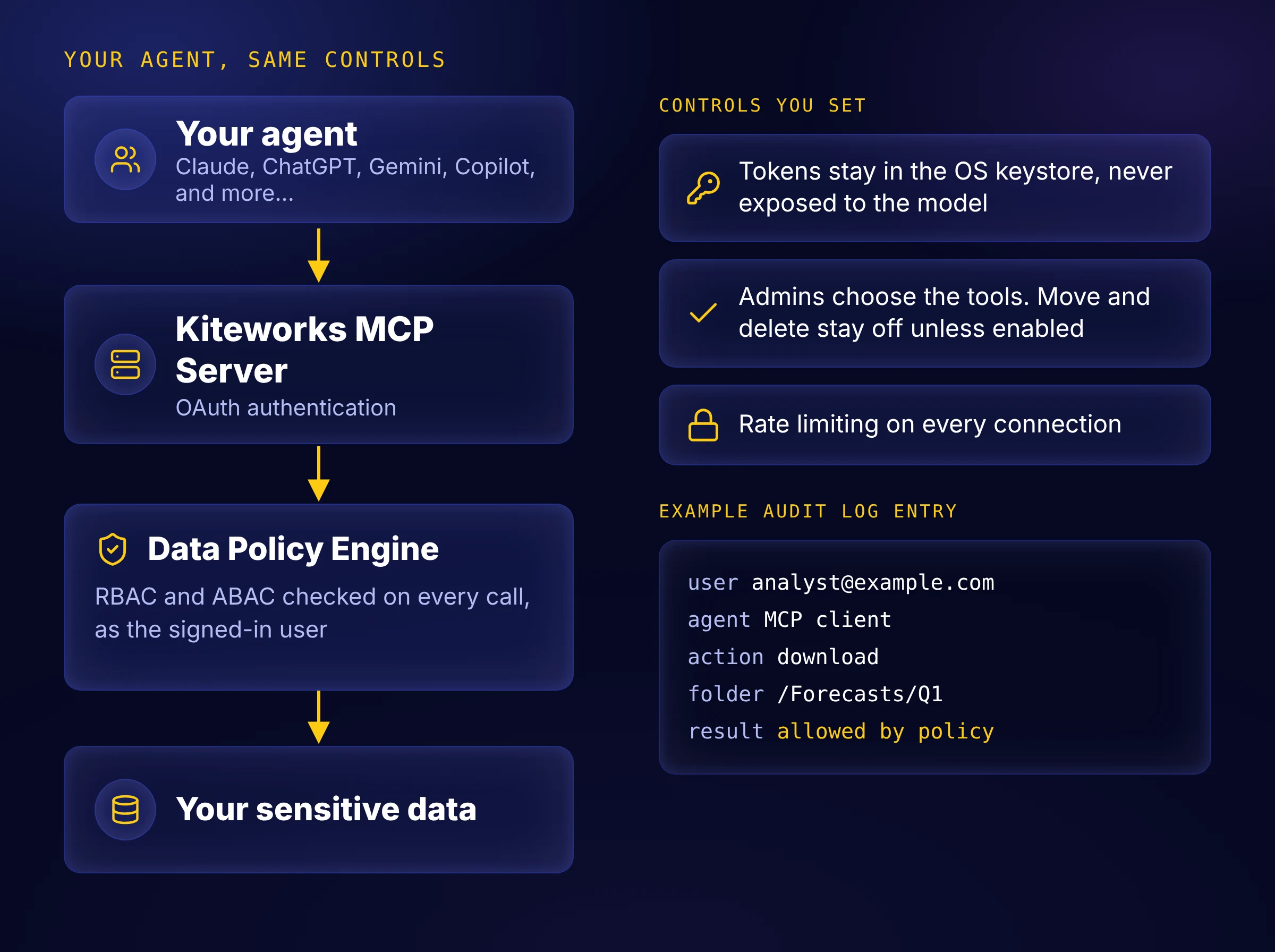
The Kiteworks MCP Server brings your own agents under the same control. Connect Claude, ChatGPT, Gemini, Copilot, and more to the Kiteworks platform. Each data request runs with the signed-in user’s permissions, the Data Policy Engine checks it, and the same audit log records it. Custom and enterprise applications can also provision Kiteworks end users and their role-based feature permissions. Admins choose which tools are on, and move and delete stay off unless enabled.
Two Kinds of Agents. One Governed Data Layer.
AI agents are arriving in every workflow. Some are ours: KAI is the AI agent built into Kiteworks. Some are yours: Claude, ChatGPT, Gemini, Copilot, and more… Kiteworks governs both at the data layer, through the Kiteworks Control Plane for Secure Data Exchange. Every agent passes through the same permissions and the Data Policy Engine, and every action is recorded in the same audit log.
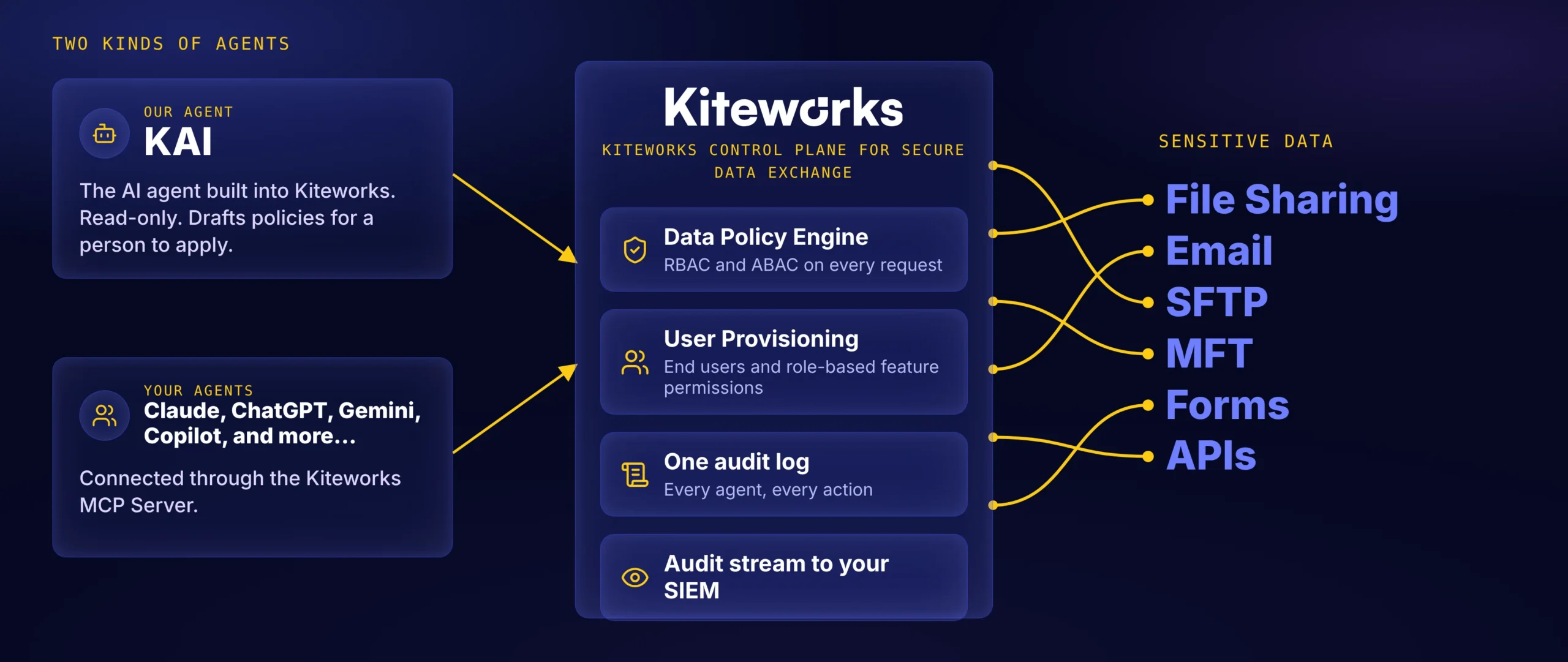
Our Agents: KAI
For Kiteworks admins and compliance teams. Ask audit and risk questions in plain language, check every lookup, and draft policies for a person to apply.
Your Agents: Kiteworks MCP Server
For agent architects and the teams that use their own AI tools. Connect your agents to Kiteworks data with the same permissions and the same audit log.
Our Agents: Ask. Verify. Act.
Audit questions should not need a reporting project. KAI lives in the “Ask KAI anything” box at the top of the Governance Center, so there is no new console and no new tool to learn.
ASK: Ask in plain language. Try asking which risk policies fired for a user, or who downloaded the most files last week.
VERIFY: Open “Show work” to review each lookup KAI made against your own activity and audit log. Verify the answer instead of trusting it.
ACT: Ask KAI to draft a policy that blocks external sharing of CUI. KAI has no write tools. A person reviews, saves, and activates the policy.
Interrogate the Audit Log
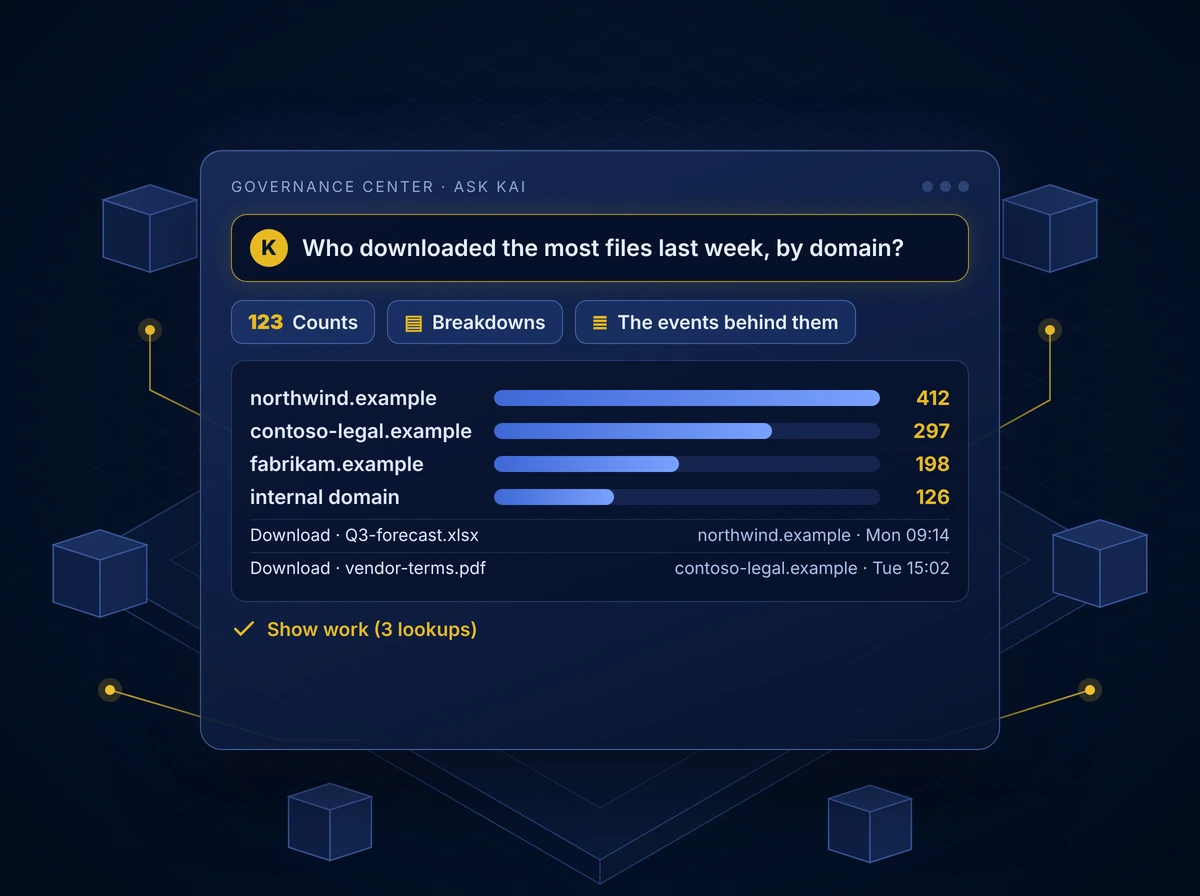
Ask a complex question about activity, such as who downloaded the most files last week, by domain. KAI answers with counts, breakdowns, and the specific events behind them. The server does the heavy lifting, so nobody counts by hand. Your first answer takes about half a minute.
- Counts: How many events match, already totaled
- Breakdowns: The same answer split by domain, user, or policy
- The specific events behind them: The individual audit log entries used to generate every number
- Show work: Every lookup KAI made is listed, so you verify instead of trust
Answer Questions About Files, Folders, and People
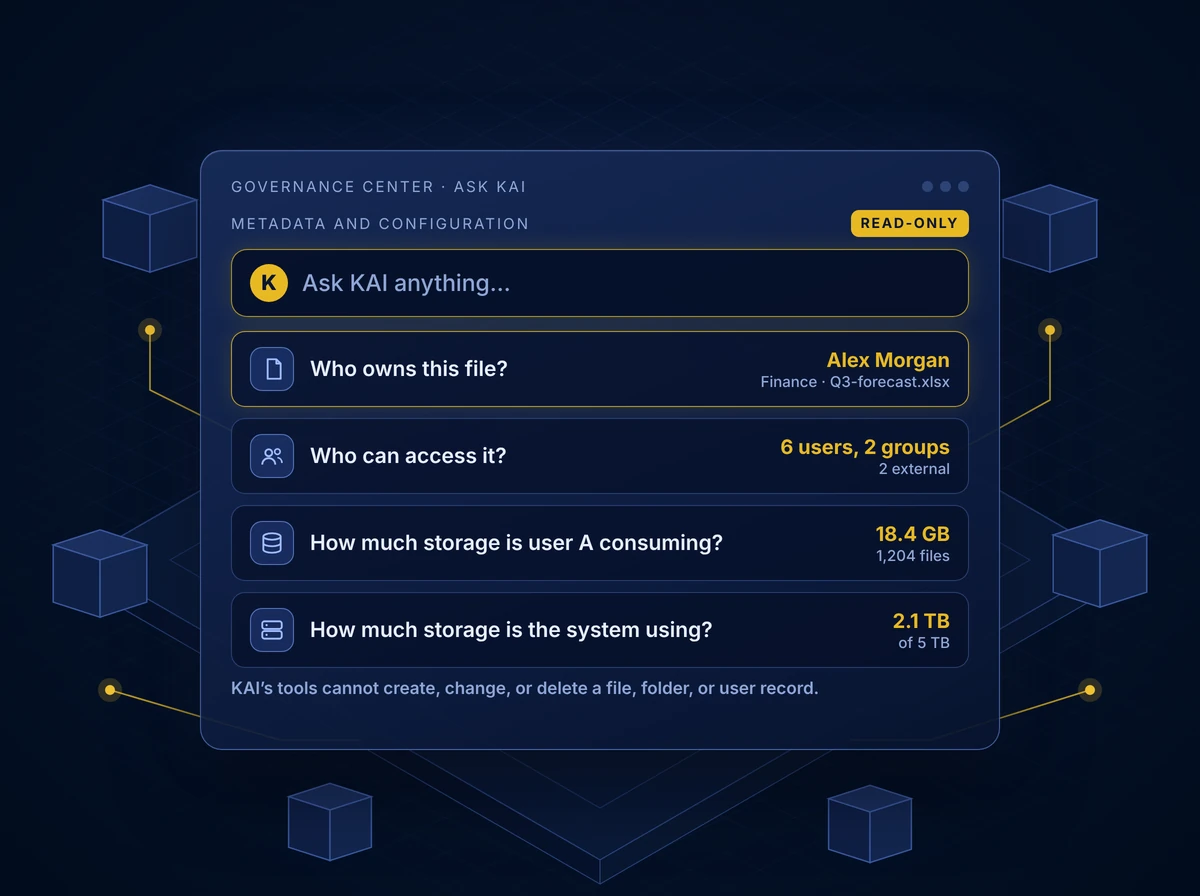
Ask about the data you govern and get an answer from your system’s metadata and configuration. Who owns a file, who can access it, and how much storage a user or the whole system is consuming are all one question away.
Ask questions such as:
- Who owns this file?
- Who can access it?
- How much storage is user A consuming?
- How much storage is the system using?
Read-only, so it is safe to explore. KAI’s tools cannot create, change, or delete a file, folder, or user record.
Use KAI to Draft a Data Policy
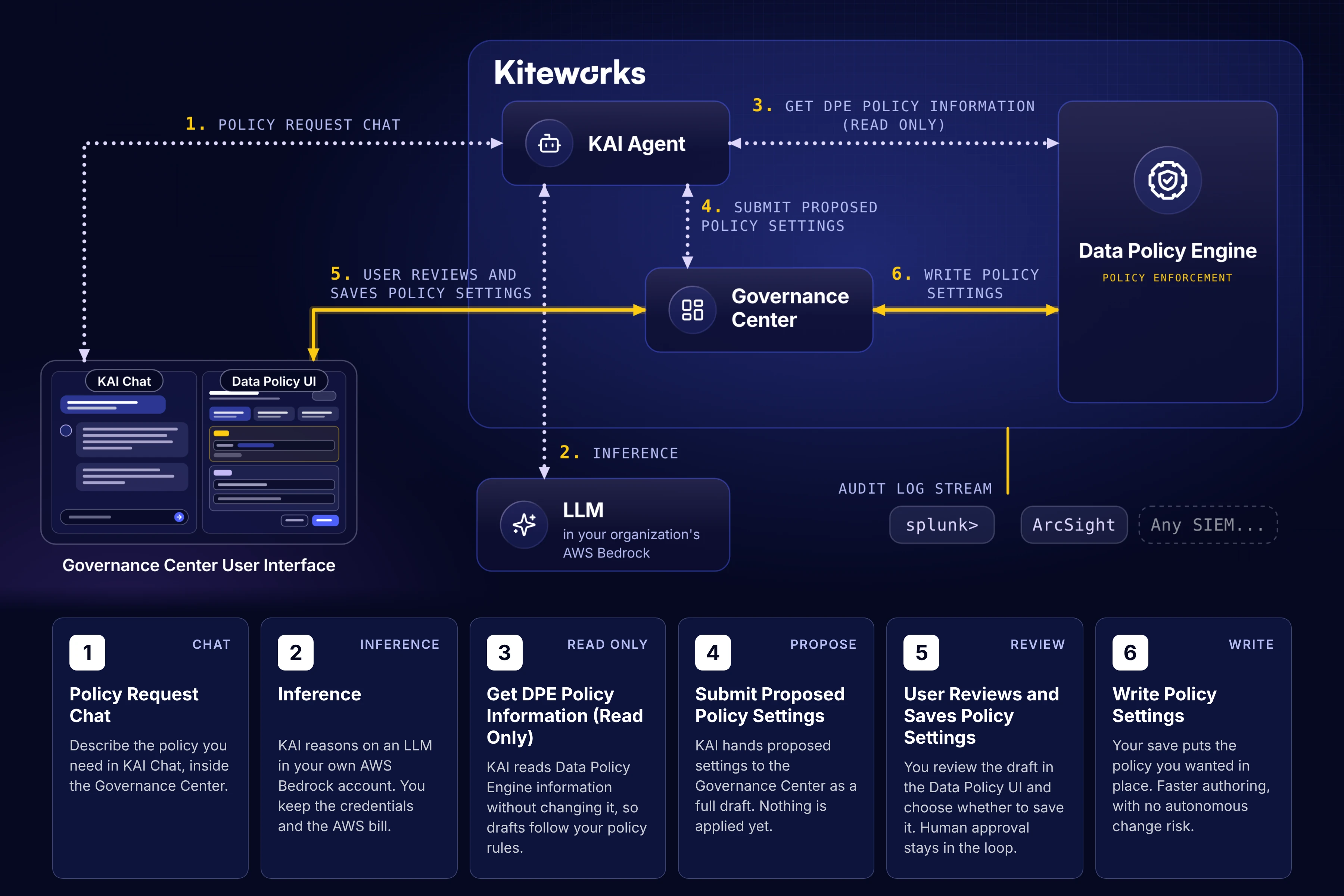
Describe the policy you need in plain language. KAI reasons on your own model, reads your Data Policy Engine settings without changing them, and hands your Governance Center a full draft. Nothing is applied until a person reviews and saves it.
An AI Agent Your Security Team Can Approve
Read-only is a feature, not a limitation. Gartner recommends proportional governance for AI agents. KAI sits at the advise level: it explains and drafts, and a person decides.
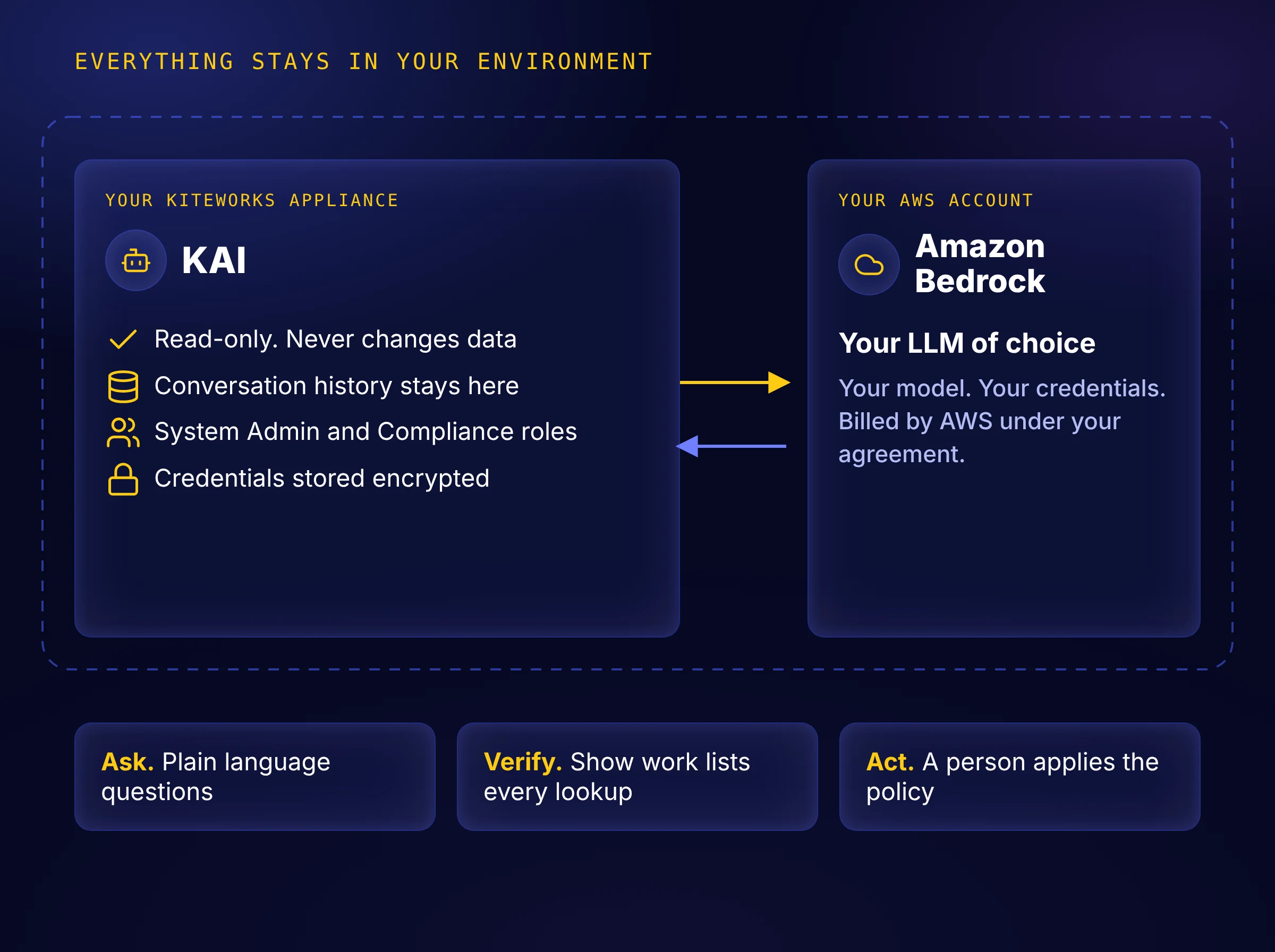
Read-Only by Design: KAI explains and drafts. It never changes data.
Your Model, Your Account: KAI runs on your LLM through your AWS Bedrock account. You hold the credentials and pay AWS directly.
History on Your Appliance: Conversation history stays on your Kiteworks appliance.
Signed-In Admin Permissions: KAI works through Kiteworks APIs as the signed-in admin. There is no back door and no separate permission model.
Built for regulated reviews:
- Chat access is limited to System Admin and Compliance roles.
- Credentials are stored encrypted, and every AI settings change is recorded in the Kiteworks audit log.
- The KAI service log never holds prompts, answers, file data, names, or email addresses.
- An admin can switch KAI off at any time without removing it.
Your Agents: Connect Them Without Losing Control
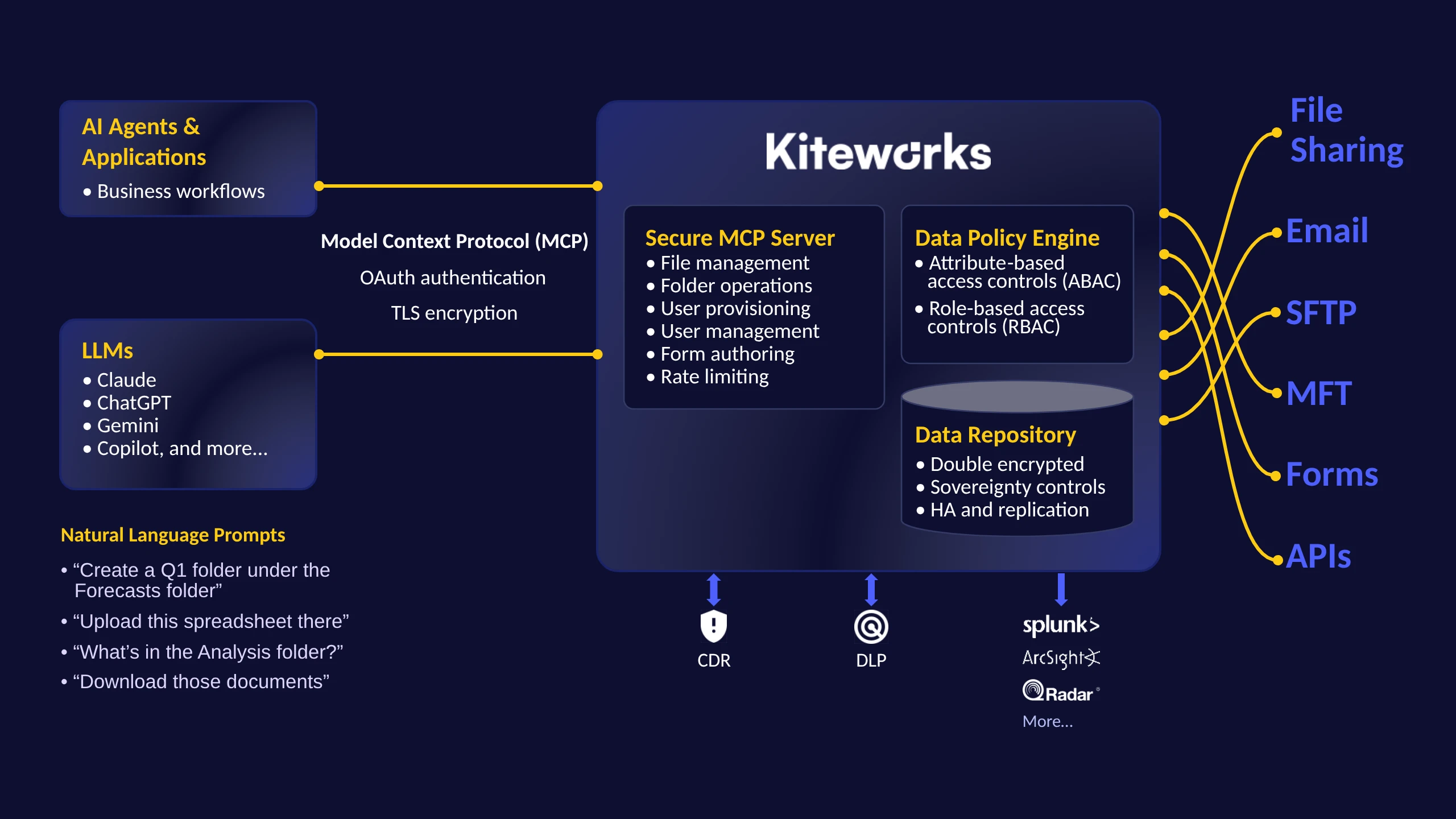
The Kiteworks MCP Server lets the AI tools your teams already use work with Kiteworks data in plain language. Claude, ChatGPT, Gemini, Copilot, and more… can manage files and folders, find user information, and more. Every request runs under the signed-in user’s permissions and is recorded in the Kiteworks audit log.
Same Permissions. Same Audit Log.
Your agents get the access the signed-in user already has, and nothing more. Admins stay in control of what each agent can do.
- Policy on every call: The Data Policy Engine checks role-based and attribute-based access controls on every request.
- Tools you choose: Admins choose the API scopes. Move and delete stay off unless enabled.
- Tokens kept safe: Tokens are stored in the operating system keystore and are never exposed to the model.
- Every action attributed: Each request is logged with the user it ran for, in the same audit log as KAI.
Kiteworks MCP Server is generally available.
Our Agent and Yours, Side by Side
| Our agent: KAI | Your agents: Kiteworks MCP Server | |
|---|---|---|
| Who it is for | Admins and compliance teams. | Teams and developers using their own AI tools and automating integrations with custom and enterprise applications. |
| What it does | Answers audit and risk questions, and drafts policies for a person to apply. | Lets your agents with end user privileges manage files and folders, author forms, and find user information, while agents with admin privileges provision and manage users and their privileges, and analyze the audit log and risk policies. |
| Whose model | Your own LLM, through your AWS Bedrock account. | Your own LLM. |
| Whose permissions | The signed-in admin’s. | For data access and form authoring: The signed-in user’s, checked by the Data Policy Engine on every call. For user provisioning and management: A signed-in help desk admin’s, checked by the Application Server on every call. |
| Write access | None. Read-only. | Only the tools your admin turns on. Move and delete are off unless enabled. |
| Audit | One shared audit log. | One shared audit log. |
| Status | Beta. | Generally available. |
Whichever agent is acting, it passes through the same Kiteworks permissions and is recorded in the same audit log.
Agents Are Arriving. Governance Has to Arrive With Them.
Gartner also advises proportional governance for AI agents, from observing to acting with approval. Controls that sit at the data layer apply to every agent, whoever built it.
40%
of enterprise applications will feature task-specific AI agents by the end of 2026, up from less than 5% in 2025.
Gartner, August 2025
97%
of organizations that reported an AI-related breach lacked proper AI access controls.
IBM Cost of a Data Breach 2025
63%
cannot enforce purpose limitations on their AI agents.
Kiteworks 2026 Forecast Report (Kiteworks survey)
60%
cannot terminate a misbehaving AI agent.
Kiteworks 2026 Forecast Report (Kiteworks survey)
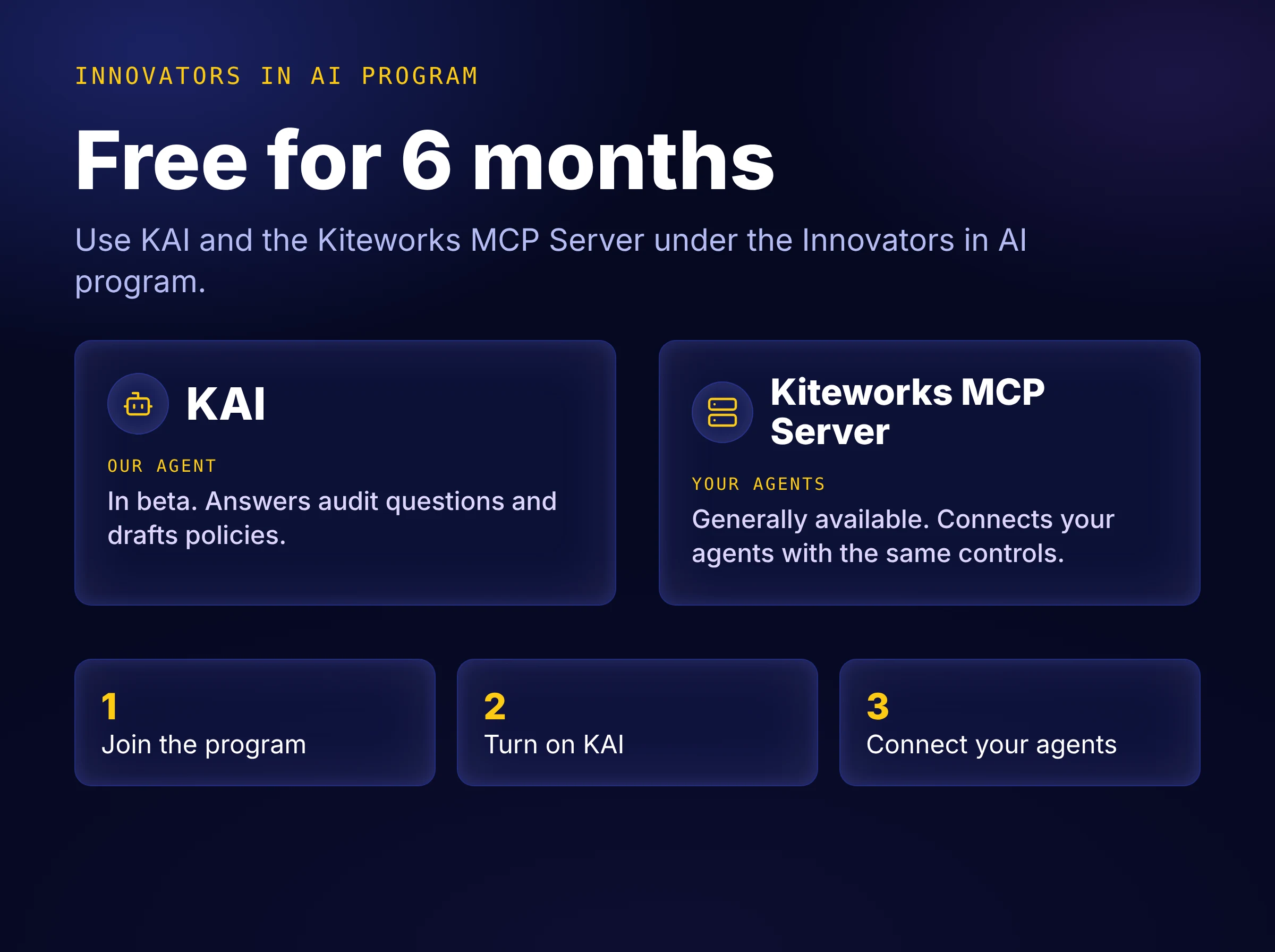
Join Innovators in AI: KAI and MCP Server Free for 6 Months
Customers who join the Innovators in AI program use KAI and the Kiteworks MCP Server free for 6 months. Join through the Innovators in AI intake form or the KAI early access form. Kiteworks MCP Server is generally available and KAI is in beta.
Frequently Asked Questions
Ask questions in plain language via the Governance Center, verify answers by reviewing every lookup under \\\\\\\\\\\\\\\”Show work,\\\\\\\\\\\\\\\” and have a human review and activate any policy drafts since KAI has no write access.
KAI answers questions about activity such as file downloads by domain, providing counts, breakdowns by user or policy, and the specific underlying events, with the server performing the heavy lifting so results arrive pre-grouped.
No, KAI is read-only by design. It can draft policies or answer questions about metadata but never changes data; a person must review, save, and activate any changes.
KAI runs on Claude via your AWS Bedrock account, stores history on your appliance, limits chat access to System Admin and Compliance roles, encrypts credentials, logs all changes, and can be disabled at any time without removal.
Featured Resources
Kiteworks Secure MCP Server: Use AI With Your Sensitive Data Without the Risk